
Change Order Log: How to Track Change Orders So They Don’t Eat Your Margin

Almost every job changes. The owner picks a different tile, the inspector wants an extra header, the wall you opened has a surprise behind it. Changes themselves are not the problem. The problem is extra work that gets done, never gets written down, and never gets paid. A simple change order log is the cheapest margin protection you will ever have.
What counts as a change
A change is anything that alters the scope, the price or the time of the contract. Typical sources:
- Owner requests: upgrades, additions, different finishes.
- Design changes: revised drawings, answers to RFIs that add work.
- Unforeseen conditions: rot, buried utilities, out-of-plumb framing, anything the contract treats as hidden or differing site conditions.
- Code or inspector requirements that were not in the drawings.
- Owner delays that cost you time and general conditions.
Whether each one is billable depends on your contract. Read the changes clause before the job starts: it usually says who can authorize a change, whether it must be in writing, and how many days you have to give notice. Missing a notice deadline can cost you the right to be paid for the change. Notice and claim rules also vary by contract type and state, so ask your attorney if a large change is in dispute.
The three stages of a change
- Potential change (PCO) or change request. Something came up. Write it down the day it happens, with photos, even before you know the price.
- Priced change proposal. You price it, including your markup and any extra days, and send it to the owner.
- Approved change order. Signed by whoever the contract says can approve. Only now does it change the contract value and get billed on your pay app.
The log tracks every item through those stages. A rejected change stays in the log too: you want a record that it was asked for and turned down.
What to record for each change
| Field | Why it matters |
|---|---|
| Number | CO #1, #2, #3: so everyone talks about the same thing. |
| Date raised | Proves you gave notice on time. |
| Description | Plain words: “Replace 14 ft of rotted sill plate, east wall.” |
| Reason / source | Owner request, design change, hidden condition, code. |
| Requested by | The person who asked, and whether they have authority. |
| Cost and price | Your cost, markup, and the amount you are asking. |
| Days added | Schedule impact, even if zero. Write “0” on purpose. |
| Status | Pending, submitted, approved, rejected. |
| Approved date and by whom | Your proof when it is billed. |
| Subcontractor change | If a sub is doing the work, the matching change to their subcontract. |
| Backup | Photos, quotes, sub proposals, marked-up drawings, emails. |
Pricing changes so they actually pay
Change work is often more expensive per unit than base-contract work: it interrupts the sequence, it is small, and it comes with extra coordination. Price it that way.
- Direct costs: labor, material, equipment, sub quotes.
- Markup for overhead and profit at the rate your contract allows. Many contracts set the markup for changes, sometimes with different rates for self-performed and sub work. Use the contract number; if there is none, use your normal rate and state it.
- Time: extra days, and the general conditions (supervision, temporary facilities, equipment rental) those days cost.
- Impact: if the change disrupts other work, say so in the proposal, even if you do not price it yet. Many contracts treat a signed change order as full payment for that change, so reserve your rights in writing if the impact is still unknown.
The habits that protect your margin
- No signature, no work, unless it is a true emergency. In an emergency, do the work, take photos, and send written notice the same day.
- Log it the day it happens. Memories get worse and arguments get stronger over time.
- Tell your field team who can approve changes. A superintendent saying “sure, we’ll do it” to the owner on site is how free work happens.
- Match every owner change to the sub changes underneath it. If the owner approves $6,000 for added circuits and you approve the electrician for $6,500, you just lost money on a change.
- Roll approved changes into the contract value and the budget right away. Otherwise the budget shows you over in a division that was actually paid for by a change.
- Review the open list every week. Pending changes that sit for months rarely get paid in full.
Why it matters for the whole job
Change orders touch everything else you track. They raise the contract value, which changes what you can bill and the percentage complete. They add lines to pay applications. They can increase retainage. They move the schedule. On a remodel, it is common for the final contract to be noticeably higher than the original: if those changes were never logged, the extra work came out of your profit.
A clean log also helps the relationship with the owner. When the owner can see every change, why it happened, what it cost and who approved it, there is far less to argue about at the end of the job.
A simple starting point
If you have nothing today, start with a single table using the fields above, one row per change, and review it in your weekly meeting. Keep the backup (photos, quotes, emails) with the number of the change, so you can find it in two minutes when the owner asks.
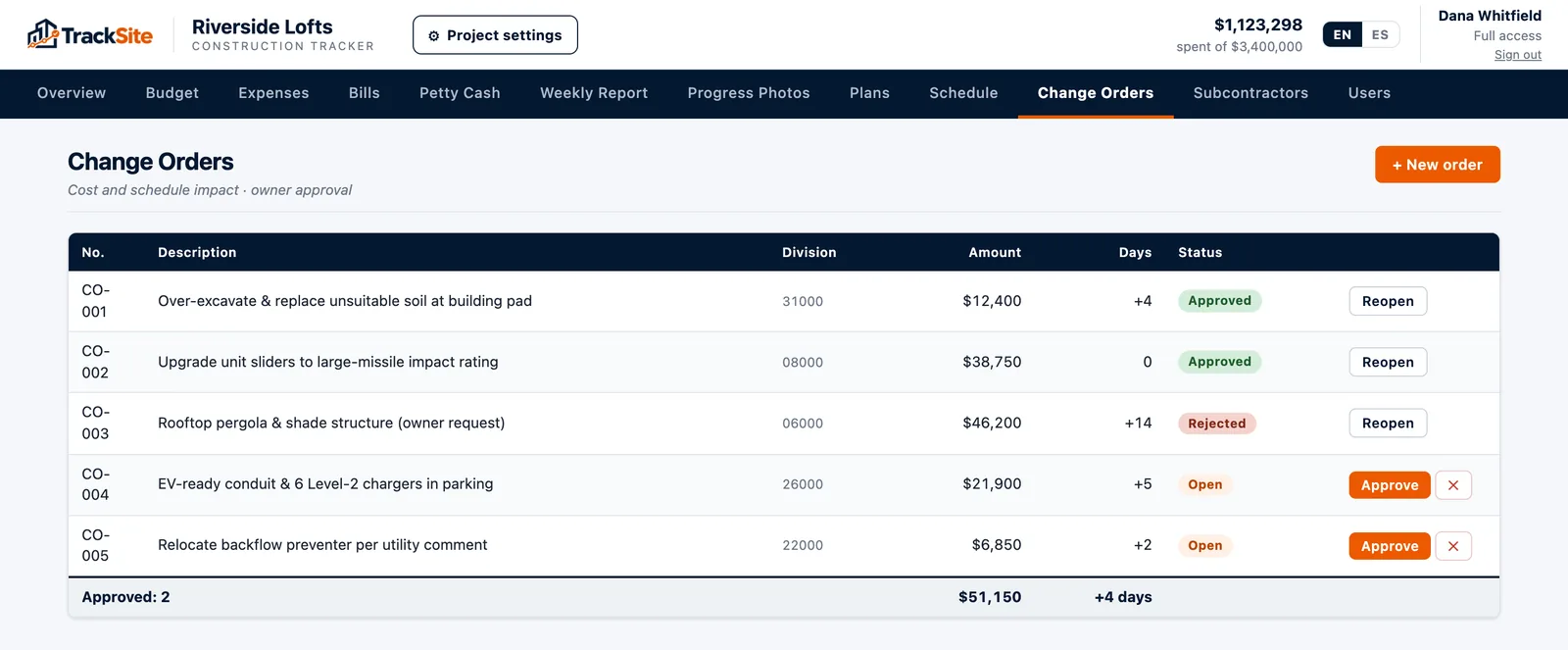
If you want it connected to the rest of the job, TrackSite keeps change orders inside the project: each one has its amount, days added and status, and approved change orders roll into the project value automatically, so the budget, the overview and the weekly report all show the real contract amount.