Subcontractor Pay Applications Explained: Schedule of Values, % Complete and Retainage

A pay application (pay app, progress billing, or payment application) is how a contractor asks to be paid for the work done in a period, usually a month. Subcontractors send pay apps to the general contractor; the GC rolls them up and sends its own pay app to the owner. Get the format right and payments move. Get it wrong and a check sits on someone’s desk for another month.
The schedule of values comes first
Every pay app is built on a schedule of values (SOV): the contract amount broken into line items, agreed before the first billing. For an electrical sub it might look like this:
| Line | Description | Scheduled value |
|---|---|---|
| 1 | Mobilization | $5,000 |
| 2 | Underground / slab | $20,000 |
| 3 | Rough-in | $70,000 |
| 4 | Panels and gear | $45,000 |
| 5 | Trim and fixtures | $50,000 |
| 6 | Closeout and as-builts | $10,000 |
| Total contract | $200,000 |
A good SOV has lines small enough to measure progress honestly, and it does not load too much value into early lines. Front-loading (putting extra value on mobilization or early work) gets the sub paid sooner, but it leaves too little money in the contract to finish if something goes wrong. As the GC, review the SOV before you sign the subcontract, not when the first pay app arrives.
What goes on each pay app
For every SOV line, the pay app shows:
- Work completed from previous applications: what was already billed.
- Work completed this period: the new progress.
- Materials presently stored: materials delivered but not yet installed, if the contract allows billing for them. Contracts usually require proof (invoices, photos, sometimes insurance or a bill of sale) and may limit stored materials to the site or a bonded warehouse.
- Total completed and stored to date, and the % complete for the line.
- Balance to finish: scheduled value minus total to date.
- Retainage on the work (and stored materials, if the contract says so).
At the bottom: total earned to date, minus retainage, minus what was already paid, equals the amount due this period.
A worked example
Month three for the electrical sub above, with 10% retainage. Lines 1 and 2 were finished earlier, rough-in was 40% done last month and is 75% done now, and panels have just been delivered and stored on site.
| Line | Value | Previous | This period | Stored | To date | % |
|---|---|---|---|---|---|---|
| 1 Mobilization | $5,000 | $5,000 | $0 | $0 | $5,000 | 100% |
| 2 Underground | $20,000 | $20,000 | $0 | $0 | $20,000 | 100% |
| 3 Rough-in | $70,000 | $28,000 | $24,500 | $0 | $52,500 | 75% |
| 4 Panels | $45,000 | $0 | $0 | $18,000 | $18,000 | 40% |
| 5 Trim | $50,000 | $0 | $0 | $0 | $0 | 0% |
| 6 Closeout | $10,000 | $0 | $0 | $0 | $0 | 0% |
| Total | $200,000 | $53,000 | $24,500 | $18,000 | $95,500 | 48% |
Now the summary:
- Total completed and stored to date: $95,500
- Retainage (10%): $9,550
- Earned less retainage: $85,950
- Less previous payments ($53,000 less 10% = $47,700): $47,700
- Current payment due: $38,250
The math is simple. What goes wrong is everything around it: a % complete that does not match the field, a previous payment number that does not match what was actually paid, or a change order billed on the wrong line.
The AIA G702 and G703 format
On commercial work, the most common format is the one published by the American Institute of Architects: the G702 (Application and Certificate for Payment) and the G703 (Continuation Sheet). The G703 is the line-by-line table above; the G702 is the one-page summary with the contract sum, net change orders, totals, retainage, previous certificates and current payment due, plus signatures and, on many jobs, a notarization and the architect’s certification. These are copyrighted forms that you license from AIA; many owners and GCs also accept their own versions with the same columns. Use whatever your contract requires.
How change orders appear
Approved change orders are usually added as new lines at the bottom of the SOV (“CO #3 – added circuits, $6,200”) and billed like any other line. The G702 summary shows the original contract sum, the net change by change orders, and the contract sum to date. Do not bill pending or unapproved changes on the pay app unless the contract explicitly allows it; they belong on a separate change order log until they are approved.
Reviewing a sub’s pay app as the GC
- Walk the job, or check the photos. Does 75% rough-in match what is on the walls?
- Check previous totals against what you actually paid.
- Check stored materials against delivery tickets and invoices.
- Confirm retainage is at the contract rate and on the right base.
- Confirm change orders billed are approved and signed.
- Collect the lien waiver your contract and state require: usually a conditional waiver for this payment and an unconditional one for the previous payment. Waiver rules and forms vary by state, and some states require specific statutory forms, so check your state’s requirements or ask an attorney.
Prompt-payment laws in many states also set deadlines for paying approved pay apps and for passing payment down to subs. The deadlines and penalties differ by state and by public vs. private work.
Keeping it straight across many subs
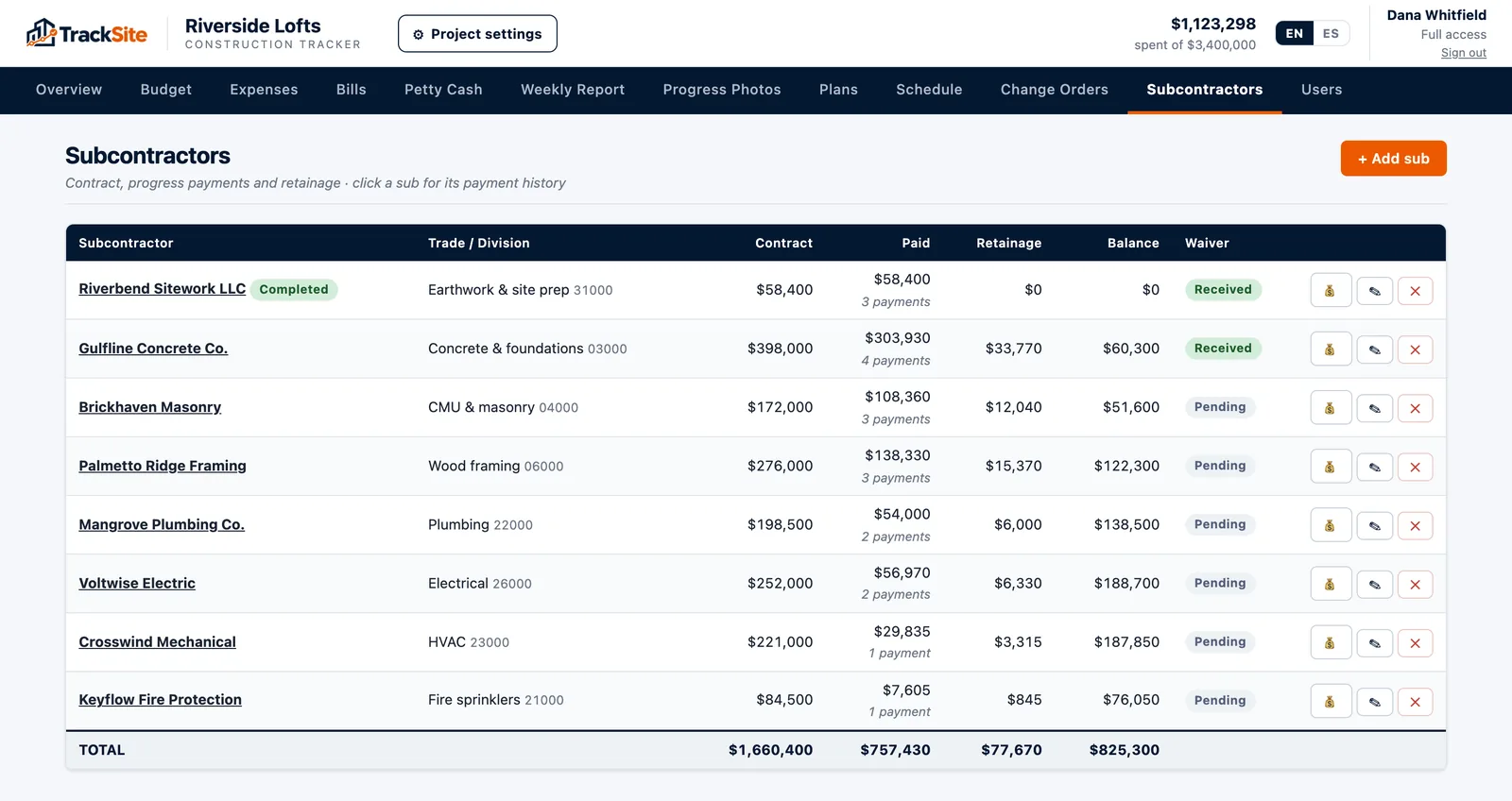
One pay app is easy. Ten subs, each billing monthly for a year, with change orders and retainage, is where spreadsheets break. For each sub you need the contract (with approved change orders), every pay app, what was paid, retainage held, and what is left to bill, and you need the same numbers rolled up for the whole project.
That is what TrackSite was built for. Each subcontractor has its contract and its list of pay applications; each one records the work billed, the retainage withheld and the payment. Totals for paid, retainage held and left to bill update themselves, and when the sub is finished you release the retainage with one click. Everything can be exported to Excel or PDF.