How to Build a Construction Budget by CSI Division (Budget, Spent, Remaining)

Most contractors start a job budget as one long list: “framing lumber,” “electrician,” “dumpster,” “permit,” “windows.” It works until the job gets busy. Then nobody can answer the simple question the owner always asks: are we on budget?
Organizing the budget by CSI MasterFormat divisions fixes that. It gives every cost a predictable home, it matches how architects write specifications and how many subs price their work, and it lets you compare one job to the next.
What CSI MasterFormat is
MasterFormat is a standard list of numbered divisions published by the Construction Specifications Institute (CSI). It is used across North America to organize specifications, bids and cost reports. The current version has 50 divisions (00 to 49), but a typical building or remodel uses only a dozen or so. Older jobs may use the earlier 16-division format; the idea is the same.
The divisions you will use most often:
| Division | Name | Typical costs |
|---|---|---|
| 01 | General Requirements | Supervision, temporary facilities, dumpsters, cleanup, insurance, permits (if not tracked separately) |
| 02 | Existing Conditions | Demolition, abatement, surveys |
| 03 | Concrete | Foundations, slabs, rebar, pumping |
| 04 | Masonry | Block, brick, stone |
| 05 | Metals | Structural steel, railings, misc. metals |
| 06 | Wood, Plastics, and Composites | Framing, sheathing, trusses, finish carpentry, cabinets |
| 07 | Thermal and Moisture Protection | Insulation, roofing, waterproofing, sealants |
| 08 | Openings | Doors, windows, hardware, storefronts |
| 09 | Finishes | Drywall, paint, tile, flooring, ceilings |
| 22 / 23 / 26 | Plumbing / HVAC / Electrical | The MEP trades |
| 31 / 32 / 33 | Earthwork / Exterior Improvements / Utilities | Sitework, paving, landscaping, utility connections |
You do not need every division. Use the ones the job has and keep the numbers, so “09 Finishes” always means the same thing on every project.
Step 1: Start from the contract value
Your budget has to add up to something. On a fixed-price job, that is the contract amount. Break it into what you expect to spend (cost) and what you expect to keep (overhead and profit). The cost side is the budget you track against.
Step 2: Put each cost line in a division
Go through your estimate and assign every line to a division. Subcontracts usually map cleanly: the drywall sub goes to 09, the electrician to 26. Materials you buy yourself go to the division they are used in, not to a generic “materials” line. A pallet of tile is 09, not “Home Depot.”
Inside a division you can keep more detail (for example 09 split into drywall, paint and flooring), but the division total is what you report.
Step 3: Do not forget soft costs
Soft costs are the things that are not bricks and labor but still cost money: design and engineering fees, permits and impact fees, inspections and testing, insurance and bonds, financing costs, and sometimes legal and accounting. Whether they belong in your budget depends on who pays them. On a design-build or owner’s-rep job they often do. Put them in Division 01 or in their own group, but put them somewhere. Missing soft costs are one of the most common reasons a job that “looked fine” ends up short.
Step 4: Carry a contingency, and track it
Contingency is money set aside for things you know will happen but cannot price yet: hidden conditions behind a wall, a price increase, a small scope gap in a sub’s bid. There is no universal number. Many builders carry a few percent on straightforward new work and more on remodels, where you will open walls you have never seen. Use your own history if you have it.
Two rules make contingency useful:
- Keep it as its own line, not hidden inside each division. Hidden contingency gets spent without anybody noticing.
- Record every draw against it with a reason: “Contingency → 06, rotten sill plate, $2,400.” At the end of the job you know exactly where it went.
Contingency is not the same as a change order. If the owner adds scope, that is a change order and it increases the contract value. Contingency covers your own risk inside the original scope.
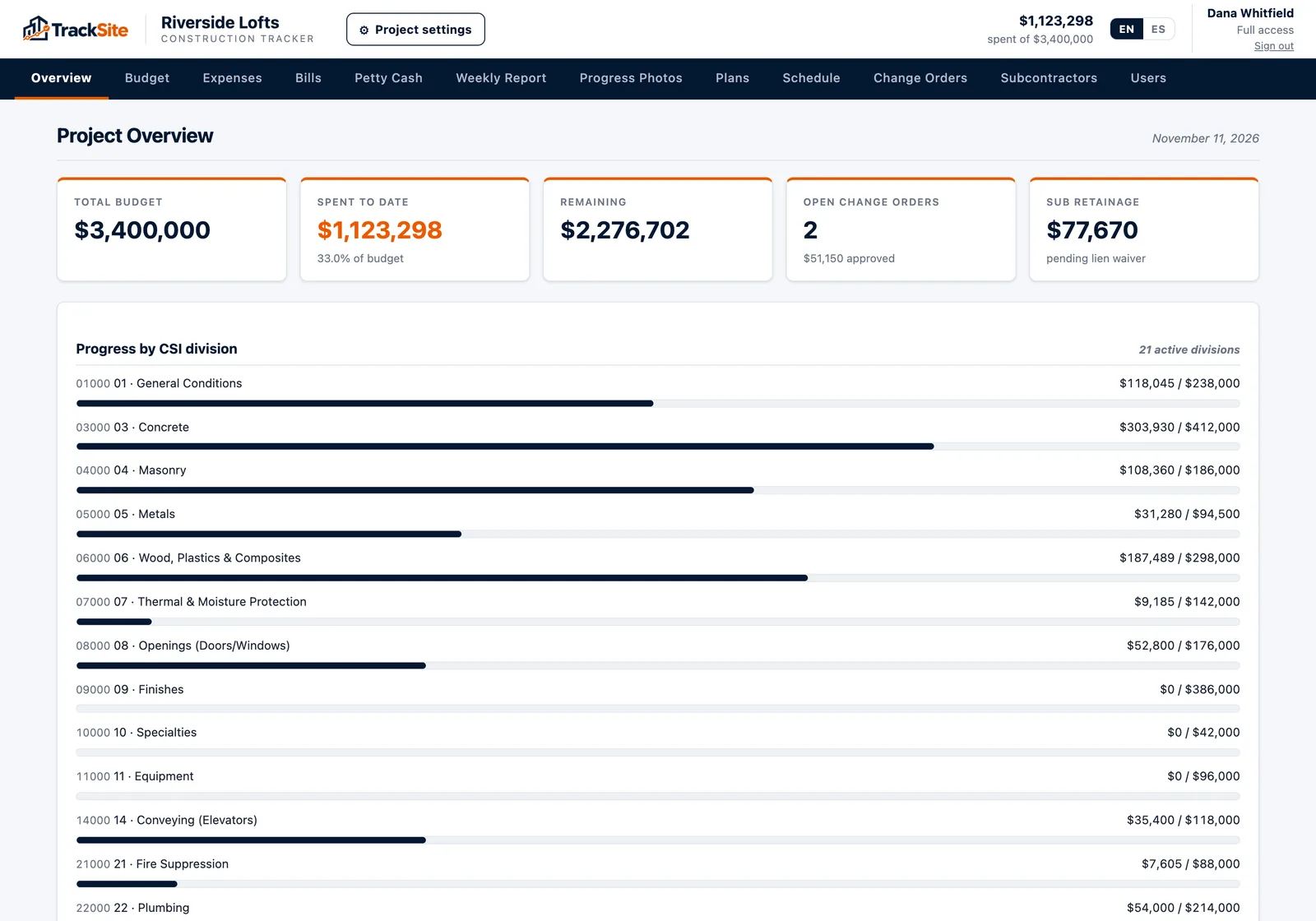
Step 5: Track budget vs. spent vs. remaining
Once the job starts, every division needs three numbers:
- Budget: what you planned to spend, including any approved changes.
- Spent: invoices and pay applications recorded so far.
- Remaining: budget minus spent.
Remaining is not the same as “what it will still cost.” If drywall is 80% spent but only 50% installed, you have a problem even though the remaining number is still positive. So add a fourth, simple column: your honest estimate of % complete. Compare % spent to % complete for each division. When spent runs well ahead of complete, look now, not at the end.
| Division | Budget | Spent | Remaining | % spent | % complete |
|---|---|---|---|---|---|
| 03 Concrete | $48,000 | $47,200 | $800 | 98% | 100% |
| 06 Wood | $92,000 | $61,000 | $31,000 | 66% | 70% |
| 09 Finishes | $75,000 | $41,000 | $34,000 | 55% | 30% |
In this example, concrete and framing are fine. Finishes needs a phone call today.
Step 6: Code every expense when it comes in
The budget is only as good as the coding of what you spend. The hardest part is not the setup: it is making sure every receipt, invoice and pay app lands in the right division the week it happens, not three weeks later from a shoebox. Make it the rule that nothing gets paid until it has a division.
Common mistakes
- One giant “materials” line. You cannot tell which trade is over.
- Change orders tracked outside the budget. The budget looks over when it is not, or under when it is not.
- Contingency spread across divisions. It disappears and nobody knows where.
- Updating once a month. By then the money is spent.
- No soft costs. Permits, testing and insurance still have to be paid.
Doing it in TrackSite
When you create a project in TrackSite you enter the contract value, and the CSI MasterFormat divisions (plus soft costs) are already there: you type the budget for each division you use. Expenses and invoices are coded to a division (TrackSite reads the vendor, date, total and division from a photo of the invoice, and you confirm it), subcontractor pay apps land in their division, and approved change orders roll into the project value. The overview shows budget, spent and remaining for every division with progress bars, so “are we on budget?” takes one screen to answer.