The Weekly Construction Progress Report Owners Actually Read (with Template)
Owners do not want more information. They want to stop worrying. A good weekly report answers the questions they would otherwise call you about: Is the job moving? Are we on schedule? Are we on budget? Do you need anything from me? If your report answers those four in the first minute of reading, it will get read, and you will get fewer calls.
Who reads it, and how
Most owners, investors and lenders read the report on a phone, between other things. Write for that:
- Put the conclusion first. The first three lines should tell the whole story.
- Short sections with headings. They will skip to the part they care about.
- Photos with captions. A photo with “Second-floor drywall hung, taping starts Monday” beats a paragraph.
- Same format every week. Readers learn where things are, and differences stand out.
- Same day every week. Friday works well: the week is done and the owner has the weekend to read.
The sections that matter
1. Summary
Three to five lines. Overall status, the most important progress, and anything the owner needs to know or decide. If there is bad news, it goes here, not at the bottom. Owners forgive delays much more easily than surprises.
2. Work completed this week
A short list by area or trade. Use plain words, not CSI codes: “Roof shingles complete,” “Kitchen cabinets set, countertop template Tuesday.” Mention inspections passed.
3. Progress photos
Four to eight photos, each with a one-line caption. Show progress, not only problems. Try to shoot some of the same views every week so the owner can see the change over time.
4. Coordination and issues
Open items that need attention: RFIs waiting on the architect, materials on backorder, inspections scheduled, utility connections pending. Say who is responsible and by when.
5. Schedule
Where you are against the plan, in one or two lines, plus the main activities for next week. If a milestone moved, say how many days and why. A simple bar chart (Gantt) is easy to read even for owners who have never seen a construction schedule.
6. Money
Keep it short and consistent: contract value (with approved change orders), billed or spent to date, and anything pending such as change orders waiting for approval. If you share budget details with the owner, show the same few numbers every week. Some contractors share only billing, not internal cost; decide what your contract and your relationship call for, and keep it consistent.
7. Decisions needed from the owner
The most useful section and the most often missing. Selections due, change orders to sign, access needed. Put a date on each one. “Tile selection needed by Wednesday 11/18 to keep the floor install on schedule.”
A simple template
Project: [Name] · Week ending: [Date] · Report #: [N]
Summary
[Overall status in one sentence.] [Main progress.] [Any problem and what you are doing about it.] [Decisions needed, if any.]
Work completed
• [Area / trade: what was done]
• [Inspection passed: type, date]
Photos
[4–8 photos, one-line caption each]
Coordination / open items
• [Item] — [who] — [by when]
Schedule
[On schedule / X days behind because…] · Next week: [main activities]
Money
Contract incl. approved COs: $[ ] · Billed / spent to date: $[ ] · Pending COs: $[ ]
Decisions needed
• [Decision] — needed by [date]
Mistakes that get reports ignored
- Too long. If it takes ten minutes to read, it will not be read.
- Only good news. Readers notice, and stop trusting it.
- Different format every week. The owner has to search for the same information again.
- Photos without captions. A photo of studs means nothing to an investor unless you say what it shows.
- Late or irregular. A report that comes “most weeks” trains the owner to call you instead.
Where the time goes, and how to get it back
The writing is not the hard part. The hard part is collecting everything on Friday afternoon: digging through phone photos, asking the superintendent what got done, checking the schedule, pulling numbers from the accounting file. If the information is captured during the week, the report is mostly done before you start.
- Have the field post progress photos every day, in one place, with the date attached.
- Keep a short daily log: crews on site, work done, inspections, deliveries, weather.
- Keep the schedule and the budget current during the week, not on report day.
With those three habits, the report is a matter of choosing photos and writing the summary.
How TrackSite does it
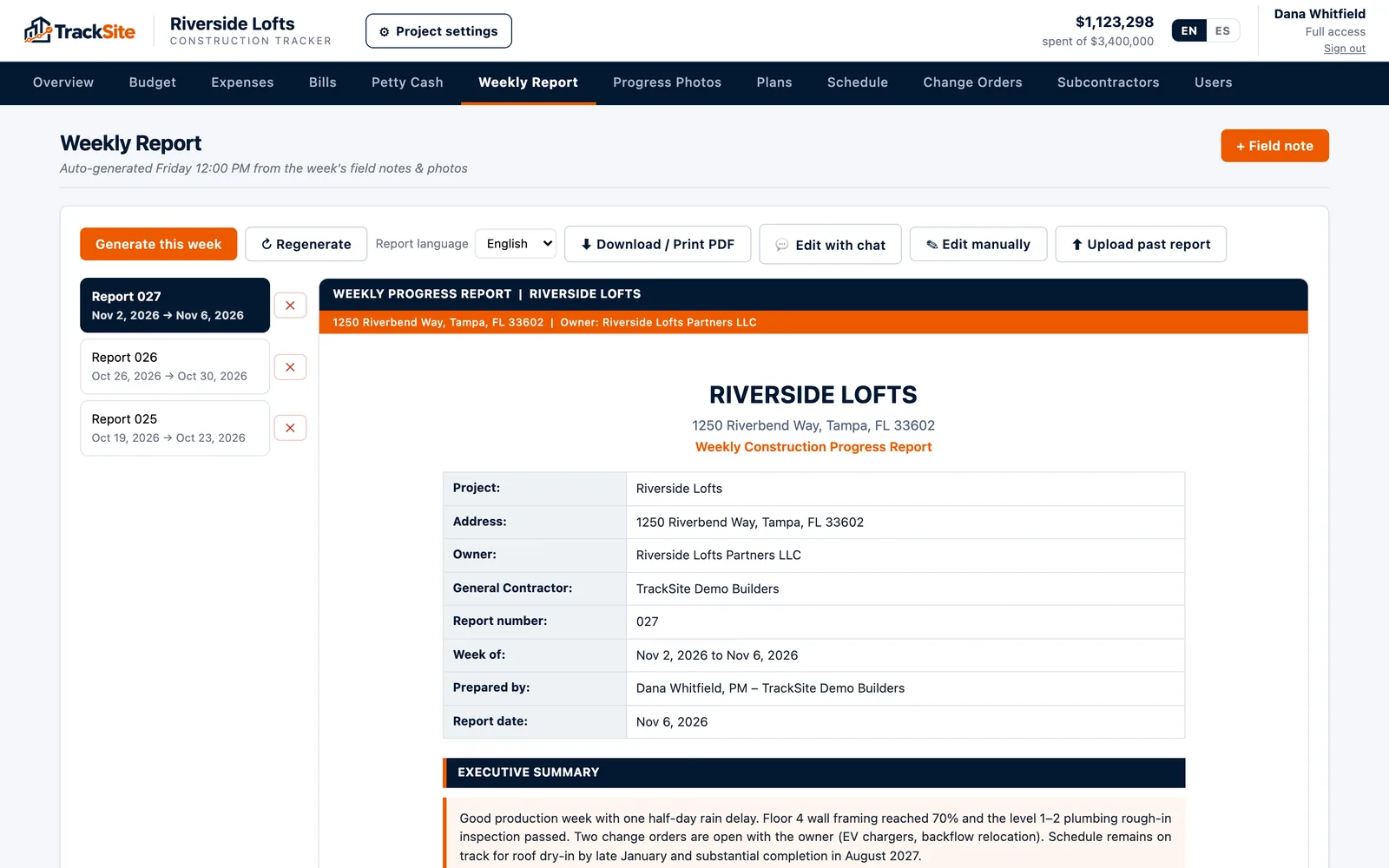
TrackSite builds this report automatically every Friday from what the team logged during the week: progress photos, the daily log, activities and coordination, the schedule and the week’s spending. It is already written when you open it; you review it, adjust what you want, and print it or send it to the owner and investors. Since everyone on the job can be invited at no extra cost, owners and investors can also log in and see the project themselves, with only what you choose to show them.